
Last updated on
Oct 31, 2026

Goodwill Industries Donation Receipt 2015-2026 free printable template
We are not affiliated with any brand or entity on this form

Fill out
Complete the form online in a simple drag-and-drop editor.

eSign
Add your legally binding signature or send the form for signing.

Share
Share the form via a link, letting anyone fill it out from any device.

Export
Download, print, email, or move the form to your cloud storage.
Why pdfFiller is the best tool for your documents and forms


End-to-end document management
From editing and signing to collaboration and tracking, pdfFiller has everything you need to get your documents done quickly and efficiently.
Accessible from anywhere
pdfFiller is fully cloud-based. This means you can edit, sign, and share documents from anywhere using your computer, smartphone, or tablet.
Secure and compliant
pdfFiller lets you securely manage documents following global laws like ESIGN, CCPA, and GDPR. It's also HIPAA and SOC 2 compliant.
What is Goodwill Industries Donation Receipt
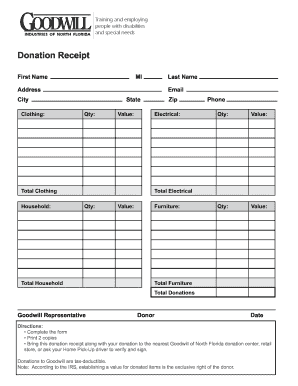
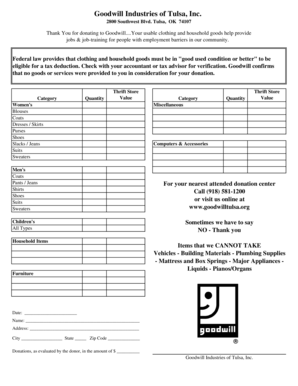
The Goodwill Donation Receipt is a personal form used by donors in New York to document their contributions of items to Goodwill Industries for tax deduction purposes.
pdfFiller scores top ratings on review platforms




Who needs Goodwill Industries Donation Receipt?
Explore how professionals across industries use pdfFiller.

Goodwill Industries Donation Receipt is needed by:
-
Individuals who donate items to Goodwill
-
Taxpayers claiming charitable donations
-
Goodwill representatives processing donations
-
Accountants or tax preparers for clients
-
Nonprofits requesting itemized donation information
Comprehensive Guide to Goodwill Industries Donation Receipt
Understanding the Goodwill Donation Receipt
The Goodwill Donation Receipt is a crucial document for donors in New York, serving as proof of charitable contributions. It plays a vital role in the documentation necessary for tax deductions, ensuring that donors can claim their donations appropriately. This receipt helps maintain transparency and accountability in charitable giving, reinforcing the importance of having a Goodwill donation receipt for all contributions made.
Purpose and Benefits of the Goodwill Donation Receipt
The primary purpose of the Goodwill Donation Receipt is to provide definitive proof of contributions made to Goodwill Industries. Donors benefit significantly from this receipt as it allows them to claim potential tax deductions. By using this receipt, donors can maximize their tax benefits while supporting a charitable cause.
Key Features of the Goodwill Donation Receipt
This donation receipt includes several important elements essential for accuracy. Key features consist of fillable fields such as Full Name, Address, and Contact Information. Additionally, donor signatures are required to validate the transaction, emphasizing the significance of providing accurate information.
Who Should Use the Goodwill Donation Receipt?
Any individual or organization making donations to Goodwill in New York should utilize this receipt. Various scenarios necessitate its use, including individuals donating clothing or appliances, businesses contributing excess inventory, and estate beneficiaries making charitable donations. Each of these donors can benefit from having a Goodwill donation receipt.
How to Fill Out the Goodwill Donation Receipt Online
-
Visit the pdfFiller platform and locate the Goodwill Donation Receipt form.
-
Begin filling out the necessary fields: enter your Full Name, Address, and other required details.
-
Ensure all contact information is correct, including your Phone and Email.
-
Provide a detailed list of the items you are donating.
-
Sign the receipt in the designated area to validate your donation.
-
Review all entered information for accuracy before submission.
Submission and Delivery Options for the Goodwill Donation Receipt
Once the Goodwill Donation Receipt is completed, there are various methods for submission. Donors can submit online through electronic means or by mailing the completed form to the designated Goodwill location. Ensure that you verify the appropriate address and submission guidelines provided by Goodwill Industries.
Security and Privacy When Using the Goodwill Donation Receipt with pdfFiller
When filling out the Goodwill Donation Receipt online, it is crucial to ensure that sensitive information is handled securely. pdfFiller employs 256-bit encryption and follows data protection standards such as HIPAA and GDPR, providing peace of mind for users as they navigate document completion securely and privately.
Common Errors to Avoid When Completing the Goodwill Donation Receipt
Many donors make frequent mistakes when filling out the Goodwill Donation Receipt, which can lead to compliance issues. To avoid these, ensure that all fields are completed accurately, double-check your items listed, and avoid omitting signatures. Attention to detail will help ensure a seamless process and maximize tax deduction benefits.
Post-Submission: What to Expect After Sending Your Goodwill Donation Receipt
After submitting the Goodwill Donation Receipt, donors can expect to receive confirmation of their submission. It is advisable to keep track of the submission status and know the steps to amend the receipt should any changes be necessary afterward. This proactive approach helps ensure that donations are recorded correctly.
Maximize Your Donation Experience with pdfFiller
Leveraging pdfFiller for the Goodwill Donation Receipt process can enhance efficiency significantly. The platform offers key features such as eSigning, form editing, and secure sharing, all of which streamline the experience of completing and submitting donations to Goodwill Industries.
How to fill out the Goodwill Industries Donation Receipt
-
1.Access PDFfiller and search for the 'Goodwill Donation Receipt' form.
-
2.Open the form to begin editing in the platform's user-friendly interface.
-
3.Before filling, gather the necessary information: your full name, address, city, state, zip code, phone number, and email.
-
4.Start filling out the fields as prompted, beginning with your full name.
-
5.Proceed to enter your address, ensuring accuracy for your tax records.
-
6.Continue with the city, state, and zip code, matching these to your official address.
-
7.Enter your phone number and email for follow-up or record-keeping purposes.
-
8.Locate the 'Donor Signature' field and ensure you sign to validate the form.
-
9.Once all fields are completed, review the form carefully for any errors or omissions.
-
10.Save your completed form to your PDFfiller account for future reference.
-
11.You can download the form in your preferred format or submit it directly if applicable.
-
12.Consider printing a copy for your records or to provide to Goodwill as proof of donation.

Who is eligible to use the Goodwill Donation Receipt?
Anyone who donates items to Goodwill in New York is eligible to use the Goodwill Donation Receipt. This includes individuals looking to claim tax deductions for their charitable contributions.
Are there deadlines for submitting the Goodwill Donation Receipt?
While there are no strict deadlines for the receipt itself, if you are claiming a tax deduction, ensure it is submitted with your tax return by the IRS deadline, typically April 15 for most taxpayers.
How do I submit the Goodwill Donation Receipt?
You typically provide the Goodwill Donation Receipt to Goodwill when donating items. If you are claiming a tax deduction, keep a copy for your records and submit it with your tax return.
What supporting documents do I need with the Goodwill Donation Receipt?
While the receipt serves as evidence of donation, it is advisable to retain an inventory list of donated items alongside the receipt for reference during tax preparation.
What common mistakes should I avoid when filling out the form?
Ensure all fields are accurately filled, especially your name and contact details. Forgetting to sign the receipt is a common mistake that can invalidate its use as proof for tax deductions.
How long does it take to process my donation through Goodwill?
Processing time can vary, but generally, acknowledgment via the receipt is immediate at the time of donation. For tax records, ensure you keep the receipt until you complete your tax filing.
Can I use this receipt for donations made to other charities?
No, the Goodwill Donation Receipt is specifically designed for documenting donations to Goodwill. Different charities have their own forms and requirements for tax deductions.
Related Forms




Related Catalogs
Get the latest insights from our blog


If you believe that this page should be taken down, please follow our DMCA take down process
here
.
This form may include fields for payment information. Data entered in these fields is not covered by PCI DSS compliance.